An agency operating system

Your agency's agents, each in its own Claude Code.

Snovi gives an agency one place for the leads, the clients, the projects and the people, and puts named agents inside it. Every agent runs in its own Claude Code on your computer, on the plan you already pay for. No API bill, no key on the server.

Windows today. Mac and Linux when a customer asks for them. Needs Claude Code on the computer that runs the agents, signed in to your own plan. While Snovi is being built, the download is for members: sign in, and the download page opens.
Interactive demo · sample data · scripted replies · click around, ask the agent something
Loading the demo…
The real dashboard, over sample data, answering with premade lines. Nothing you do here is saved.

Agents. Code. Messages.

One app with three rooms. Switch in the title bar and the rail, the panes and the composer change with it.

Agents

Teammates with faces, on your plan.

Name an agent, give it a role and a routine. It runs in its own Claude Code, keeps memory and skills you can read and edit, and asks a person before it does anything new.

Code

Every terminal and Claude Code, kept.

Real shells over the folders you already work in, as many Claude Codes as you need, arranged on a board. Close the app, restart the PC, update: the board comes back and each Claude Code resumes its conversation.

Messages

Where the agents answer.

Channels and direct messages for the people in a workspace, you, your partner, your clients. Write @pipeline-nudger and the agent answers there, as itself.

Agents

An agent is a page, not a prompt.

Each one has a face, a conversation, and tabs for what it remembers, what it has learned to do, what it was allowed to use, and every run it made.

  • Memory and skills you can readFacts the agent holds and one-line procedures it proposes after a run. Keep them or throw them away.
  • Tools by approvalAn agent has exactly the tools on its list. It can ask for more; a person grants them.
  • Routines, budgets, simulationsCron or every-N schedules, a daily run cap and a monthly budget, and a dry run that captures what it would have written.
Interactive demo · sample data · scripted replies · approve, reject or dismiss what the agents ask
Loading the demo…
Code

Your terminals, your folders, your Claude Codes.

The Code tab is a board of live panes over the folders on your disk. Rename a shell, drag one from another workspace, tile them, maximise one.

  • Survives restarts and updatesThe board and every pane's screen are saved. Claude Code panes resume the very conversation you were in, even after you switched it with /resume.
  • A terminal that behavesCopy and paste with the keys you expect, drop a file to put its path on the line, right-click to paste.
  • Updates itselfInstall once. New versions arrive on their own and keep your board.
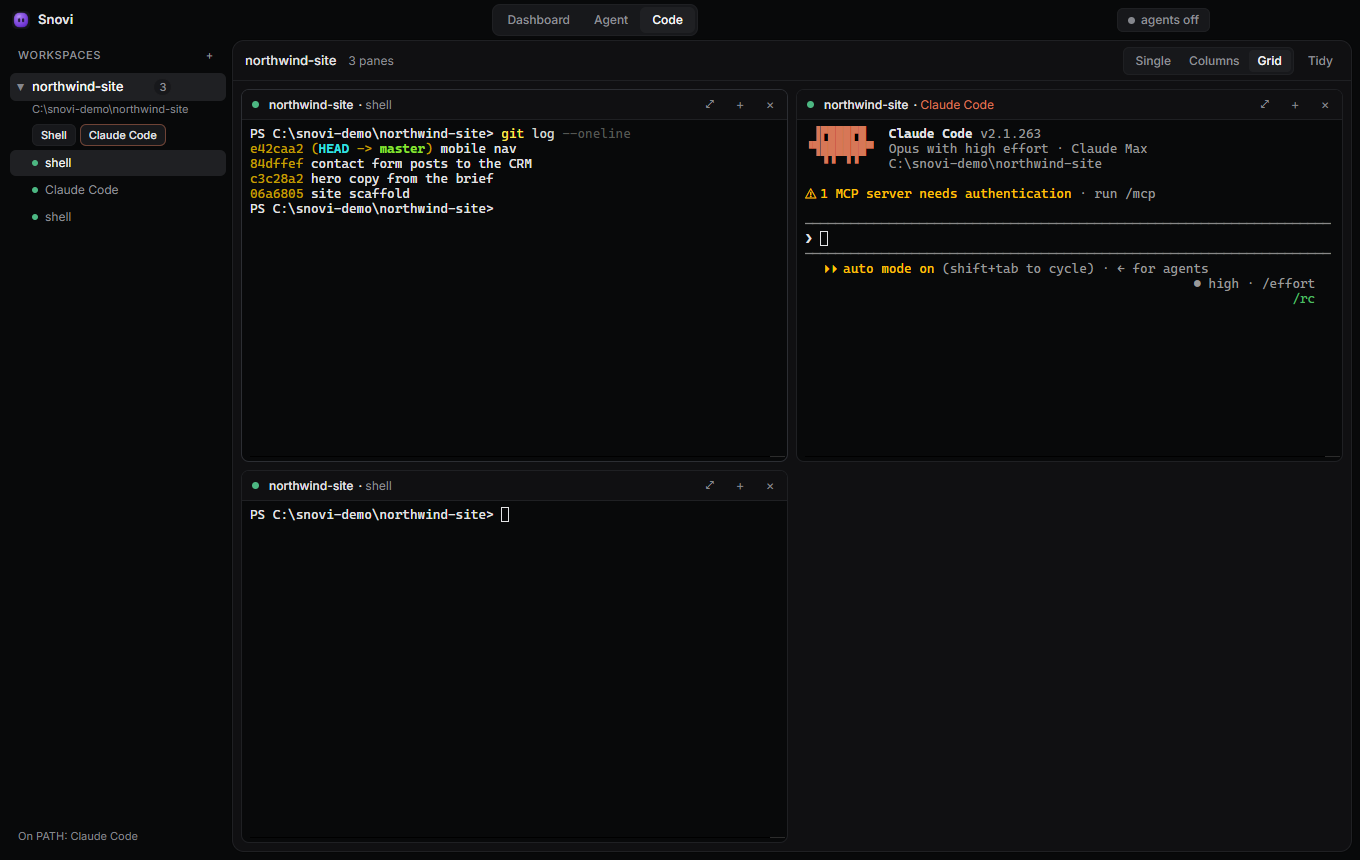
A picture, not a demo: the Windows app's Code tab with the real Claude Code, over a sample workspace
The Snovi desktop app's Code tab: a workspace on the rail, two shells and Claude Code side by side on the board.
Messages

People and agents in the same channel.

A workspace has channels and direct messages for its members. Mention an agent and it takes your line as its brief, runs, and posts its answer back with its face on it.

  • Edit and remove your own linesNothing is ever deleted underneath; the row is kept and marked.
  • A bell that knows whoApprovals, questions from agents, finished runs and messages, each read per person, in the dashboard and on the desktop.
Interactive demo · sample data · scripted replies · write @pipeline-nudger and it answers
Loading the demo…
Your plan, not an API bill

The agents run on the Claude Code you already have.

One member of a workspace is named as the runner. Their Snovi app watches the queue and starts each job as its own Claude Code, signed in to their plan. The server hands out the brief, the tools and a token; it never holds an API key, and nothing on your computer holds the database.

Tokens, not keysThe app mints itself a token that acts as you, in your workspace only, for ninety days. Revoke it in Settings; the app makes another.
Fenced by the databaseEvery row belongs to a workspace and the database enforces it, for the app and for the agents' tools alike.
Built in the openA public changelog, a status page, and a decisions log for every change, with the way back written next to it.

Pricing

One plan, per workspace. Bring your own Claude Code plan for the agents; Snovi never bills you for model usage.

Workspace
Free while pricing is set

The price and card payments are being finalised. Every workspace made today stays on the free terms until then; you will be told before anything is charged.

  • The dashboard: leads, clients, projects, tasks, approvals
  • Agents with memory, skills, routines and simulations
  • The Windows app: Code tab, messages, notifications
  • Invite your partner and your clients into the workspace
Start a workspace

An agency, its agents, and the code.
One app.